


Make Your Own Style
Built for Performance, Styled By You
Style your space and make it more special with LG Objet WashTower™.
 Air Purifier15 products
 Dishwasher18 products
 Fridge & Freezer100 products
 Nespresso13 products
 Sound Device23 products
 TVs14 products
 Vacuum Cleaner21 products
 Washer & Dryers46 products
Showing 49–60 of 581 resultsSorted by latest

No more excessive bending just to load up the dishwasher. With a Fisher & Paykel DishDrawer, you can easily load your dirty dishes for a proper cleaning without having to fiddle with shaky baskets.

There are ranges of flexible and adjustable racking options that help cater to different wash requirements. Much of the dishdrawer’s racking can be folded and adjusted to fit items of different sizes. There’s also a removable cutlery basket that can be customized for different utensils and incorporates a separate small item container for easy loading and unloading.

Keep it on the down-low with this Fisher & Paykel DishDrawer. A well-insulated design coupled with less moving parts, makes this dishwasher quieter than you would expect. Pair that with a built in timer and you’ll be saving money washing dishes in off-peak times, without disturbing anyone’s sleep.

The Sanitise program will increase the temperature of the final rinse to kill 99.9% of bacteria. The Quick option speeds up the wash cycle without compromising wash performance, and the Extra Dry option devotes extra time to drying plasticware that doesn’t evaporate water droplets as easily.
| Dishwasher type |
DishDrawer |
|---|---|
| Model Number |
DD60STI9 |
| Weight (kg) |
31 kg |
| Depth (mm) |
571 mm |
| Height (mm) |
454 mm |
| Width (mm) |
599 mm |
| Power (W) |
1200 W |
| Accessories included |
1 x 1650mm Inlet Hose
1 x 2000mm Drain Outlet Hose
|
| Can accommodate large dishes | |
| Capacity Place Settings |
7 |
| Finish Colour |
Integrated (Own Cabinetry) |
| Notes |
Custom-made Fascia Door Panel supplied by your builder or cabinet maker. |
| Removable Lid | |
| Finish Colour Description |
Integrated Optional Custom Door Panel Required |
| Installation Note |
Built into a cupboard Installation. |
| Water Inlets |
Cold Only |
|---|---|
| Features |
Installation: Designed to be installed in between cupboards with a custom-made Door Fascia Panel.
Controls: Electronic touch control.
Knock to Pause: A double knock on the front panel will pause the dishwasher which can be re-started again by using the start/play button.
Maximum Plate Size: 310mm Plate Size.
Delay timer: Energy saving delay start option of up to 12 hours.
Drying System: Fan Assisted Drying.
Quiet Performer: Running at a very low decibel rate, these DishDrawer Dishwashers do their job without making a fuss.
Sanitise and Extra Dry: The Quick wash modifier delivers a faster wash while maintaining performance. The Sanitise option provides extra protection, killing 99.9% of bacteria in the final rinse.
Extra Features: End-of-Cycle Beeps, Keylock, Rinse aid Indicator, Smart Drive Technology.
Wash programs:
Delicate
Eco
Fast
Heavy
Medium
Rinse
Wash Program Modifiers:
Extra dry
Quick
Sanitise
|
| Height Adjustable Upper Basket | |
| Control type |
Touch controls |
| Cutlery Drawer | |
| Direct Drive Motor | |
| Display Panel |
LED |
| Time delay | |
| Heavy Cycle | |
| Cutlery basket |
| Manufacturer Warranty |
2 Years |
|---|---|
| Use |
Not intended or designed for commercial use. |
| Energy Star Rating |
 3.5 Stars 3.5 Stars |
|---|---|
| Energy Consumption(kWh/annum) |
136 |
| Type of connection |
10A plug & lead |
|---|---|
| Connected load |
1.2 kW |
| Connection requirements |
This product requires a 10amp electrical connection. For more information, please contact Winning Services on 1300 020 020 or your electrician. |
| Maximum current rating |
5 A |
| Length of cord |
1.65 m |
| Child lock | |
|---|---|
| Auto Power Off | |
| Lockable Door | |
| Overflow Protection | |
| Fault Indicator |
| 70 Degree wash program | |
|---|---|
| Number of Programs |
15 Programs |
| Quick wash | |
| Rinse Cycle | |
| Half load option | |
| Heavy Wash |
| Delay Start | |
|---|---|
| Auto Load Sensing | |
| Time Remaining Display |
| Litres Used Per Wash |
6.9 L |
|---|---|
| Water Star Rating |
 4.5 Stars 4.5 Stars |
| Litres Per Cycle |
6.9 Ltr/Cycle |
| WELS Product Registration Number |
D02060 |
| Light | |
|---|---|
| Steam | |
| Eco Mode | |
| Steam clean |
| Noise when working |
43 dB |
|---|
| Origin |
Thailand |
|---|
| WiFi |
|---|
| Filtration |
Triple Stage Filtration System |
|---|---|
| Lid Included | |
| Primary Product Category |
DishDrawer Dishwashers |
| Water efficient |
4.5 |
| Energy consumption |
136 Kwh |
| Big dish friendly | |
| Rinse aid light Notification | |
| End of Wash Alarm | |
| Dishwasher Compartments (Foldable Bottom Racks) | |
| Dishwasher Compartments (Foldable Cup Shelves) | |
| Tall Glass Rack | |
| Dishdrawer | |
| Custom Installation | |
| Dishwasher Drawers |
Single Drawer |
| Fast Wash Option | |
| EAN |
9415112812105 |
| Eco Program | |
| Detachable lid |
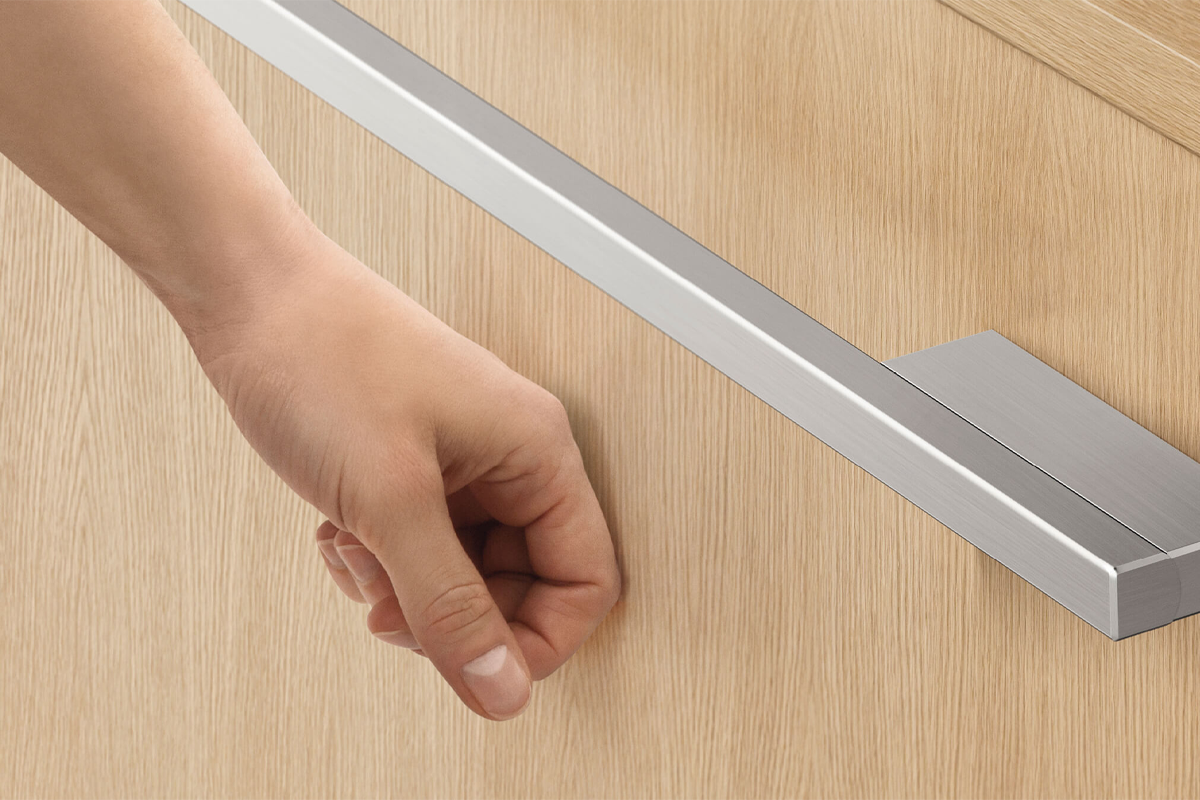
To pause a cycle, all you have to do is knock on the front panel. To restart, simply press the start/play button. This feature is especially handy if you’re prone to forgetting that pesky plate in the sink.
No more excessive bending just to load up the dishwasher. With a Fisher & Paykel DishDrawer, you can easily load your dirty dishes for a proper cleaning without having to fiddle with shaky baskets.

Running at a very low decibel rate, these dishwashers do their job without making a fuss. Even the end-of-cycle alerts can be turned off.

The ideal place for all of your cutlery items, designed to wash them in the most effective manner. The basket can be adjusted or moved as needed, if you need to make room for bulky items.
| Dishwasher type |
Fully Integrated |
|---|---|
| Model Number |
DD60STX6I1 |
| Weight (kg) |
33 kg |
| Depth (mm) |
571 mm |
| Height (mm) |
454 mm |
| Width (mm) |
599 mm |
| Power (W) |
1200 W |
| Accessories included |
1 x 1650mm Inlet Hose
1 x 2000mm Drain Outlet Hose
|
| Can accommodate large dishes | |
| Capacity Place Settings |
7 |
| Finish Colour |
Integrated (Own Cabinetry) |
| Notes |
** Custom Fascia Door Panel required supplied by the Builder or Cabinet maker** |
| Removable Lid | |
| Finish Colour Description |
Fully Integrated, Optional Custom Made Fascia Panel Required |
| Installation Note |
Built into Cupboards Installation |
| Heavy | |
|---|---|
| Number of Programs |
8 Programs |
| Quick wash | |
| Pre wash | |
| Rinse Cycle | |
| Half load option | |
| Auto Program |
| Water Inlets |
Cold Only |
|---|---|
| Features |
Installation: Designed to be installed in between cupboards with a custom-made Door Fascia Panel.
Controls: Electronic touch control.
Knock to Pause: A double knock on the front panel will pause the dishwasher which can be re-started again by using the start/play button.
Maximum Plate Size: 310mm Plate Size.
Delay timer: Energy saving delay start option of up to 12 hours.
Drying System: Fan Assisted Drying.
Quiet Performer: Running at a very low decibel rate, these DishDrawer Dishwashers do their job without making a fuss.
Sanitise and Extra Dry: The Quick wash modifier delivers a faster wash while maintaining performance. The Sanitise option provides extra protection, killing 99.9% of bacteria in the final rinse.
Extra Features: End-of-Cycle Beeps, Keylock, Rinse Aid Indicator, Smart Drive Technology.
Wash programs:
60Min
Auto
Eco
Glassware
Heavy
Light
Medium
Rinse
Wash Program Modifiers:
Dry Plus
Quiet
Sanitise
|
| Control type |
Touch controls |
| Cutlery Drawer | |
| Direct Drive Motor | |
| Display Panel |
LED |
| Time delay | |
| Heavy Cycle | |
| Cutlery basket |
| Manufacturer Warranty |
2 Years |
|---|---|
| Use |
Not intended or designed for commercial use. |
| Energy Star Rating |
3.5 Stars |
|---|---|
| Energy Consumption(kWh/annum) |
137 |
| Type of connection |
10A plug & lead |
|---|---|
| Connected load |
1.2 kW |
| Connection requirements |
This product requires a 10amp electrical connection. For more information, please contact Winning Services on 1300 020 020 or your electrician. |
| Maximum current rating |
5 A |
| Length of cord |
1.65 m |
| Child lock | |
|---|---|
| Lockable Door | |
| Fault Indicator |
| Delay Start |
|---|
| Litres Used Per Wash |
5.7 L |
|---|---|
| Water Star Rating |
 5.5 Stars 5.5 Stars |
| Litres Per Cycle |
5.7 Ltr/Cycle |
| WELS Product Registration Number |
D02591 |
| Light | |
|---|---|
| Eco Mode |
| Noise when working |
43 dB |
|---|
| Origin |
Thailand |
|---|
| WiFi |
|---|
| Filtration |
Triple Stage Filtration System |
|---|---|
| Lid Included | |
| Primary Product Category |
DishDrawer Dishwashers |
| Energy consumption |
137 Kwh |
| Big dish friendly | |
| Rinse aid light Notification | |
| End of Wash Alarm | |
| Dishwasher Compartments (Foldable Bottom Racks) | |
| Dishwasher Compartments (Foldable Cup Shelves) | |
| Tall Glass Rack | |
| Dishdrawer | |
| Custom Installation | |
| Dishwasher Drawers |
Single Drawer |
| EAN |
9415112821701 |
| Eco Program | |
| Detachable lid |
To pause a cycle, all you have to do is knock on the front panel. To restart, simply press the start/play button. This feature is especially handy if you’re prone to forgetting that pesky plate in the sink.
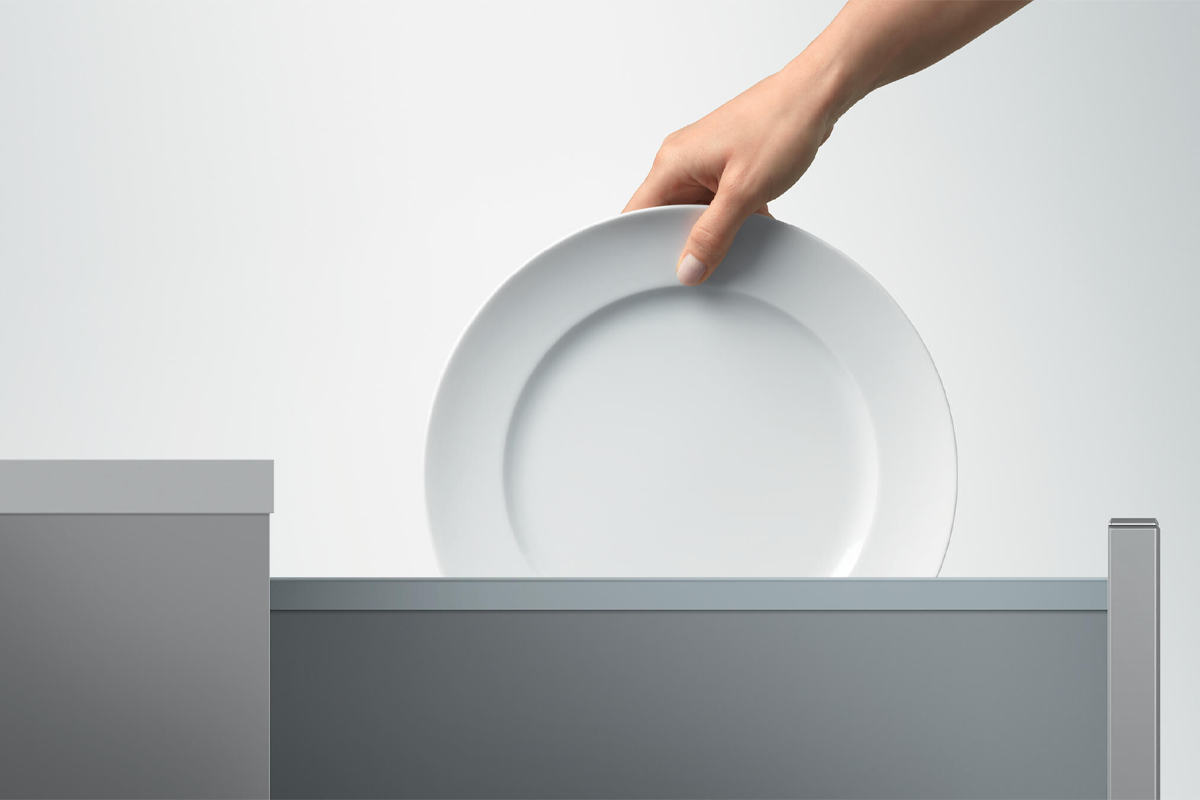
This DishDrawer opens as easily as the drawers in your kitchen cabinet. You can even install the DishDrawer at bench height to reduce the amount of bending necessary to load and unload.
Running at a very low decibel rate, these dishwashers do their job without making a fuss. Even the end-of-cycle alerts can be turned off.
The ideal place for all of your cutlery items, designed to wash them in the most effective manner. The basket can be adjusted or moved as needed, if you need to make room for bulky items.
| Dishwasher type |
Fully Integrated |
|---|---|
| Model Number |
DD60DTX6I1 |
| Depth (mm) |
571 mm |
| Height (mm) |
865 mm |
| Width (mm) |
599 mm |
| Accessories included |
1 x 1650mm Inlet Hose
1 x 2000mm Drain Outlet Hose
|
| Can accommodate large dishes | |
| Capacity Place Settings |
14 |
| Finish Colour |
Integrated (Own Cabinetry) |
| Removable Lid | |
| Finish Colour Description |
Fully Integrated Model that will require custom facia door panels to be provided by your cabinetmaker. |
| Installation Note |
Built under a benchtop with a Custom made Fascia Door Panel. |
| Water Inlets |
Cold Only |
|---|---|
| Features |
8 Wash Cycles: 60 min, Auto, Eco, Glassware, Heavy, Light, Medium, Rinse.
Large Plates: The tall top drawer fits your larger plates and dishes up to 310mm, while the bottom drawer is ideal for small washes. Flexible racking includes height-adjustable cup racks and wine glass supports.
Premium stainless steel interior, and soft-close drawers with a knock to pause function
Half Load: Both drawers fit a true half-load. Each drawer operates independently, so you can wash one load while stacking the other drawer, or wash simultaneously on separate cycles.
Wi-Fi Connect: With Wi-Fi capability and a SmartHQ™ app for remote control and notifications.
Wash Program Modifiers: Dry Plus, Quiet, Sanitise.
Extra Features: Fan Drying Assist, Flow Through Detergent Dispenser, Quiet Operation, Spray Arm Sensing.
|
| Height Adjustable Upper Basket | |
| Control type |
Touch controls |
| Cutlery Drawer | |
| Direct Drive Motor | |
| Display Panel |
LED |
| Heavy Cycle | |
| Cutlery basket |
| Manufacturer Warranty |
2 Years |
|---|---|
| Use |
Not intended or designed for commercial use. |
| Energy Star Rating |
 4 Stars 4 Stars |
|---|---|
| Energy Consumption(kWh/annum) |
115 |
| Type of connection |
10A plug & lead |
|---|---|
| Connection requirements |
This product requires a 10amp electrical connection. For more information, please contact Winning Services on 1300 020 020 or your electrician. |
| Length of cord |
1.65 m |
| Child lock | |
|---|---|
| Fault Indicator |
| Delay Start | |
|---|---|
| Auto Load Sensing | |
| Time Remaining Display |
| Litres Used Per Wash |
5.7 L |
|---|---|
| Water Star Rating |
5.5 Stars |
| Litres Per Cycle |
5.7 Ltr/Cycle |
| WELS Product Registration Number |
D02561 |
| Light | |
|---|---|
| Eco Mode |
| Noise when working |
43 dB |
|---|
| Number of Programs |
8 Programs |
|---|---|
| Quick wash | |
| Rinse Cycle | |
| Half load option |
| Origin |
Thailand |
|---|
| WiFi |
|---|
| Lid Included | |
|---|---|
| Primary Product Category |
DishDrawer Dishwashers |
| Energy consumption |
115 Kwh |
| Big dish friendly | |
| Rinse aid light Notification | |
| Dishwasher Compartments (Foldable Bottom Racks) | |
| Dishwasher Compartments (Foldable Cup Shelves) | |
| Tall Glass Rack | |
| Dishdrawer | |
| Custom Installation | |
| Dishwasher Drawers |
Double Drawer |
| EAN |
9415112821688 |
| Detachable lid |
This DishDrawer opens as easily as the drawers in your kitchen cabinet. You can even install the DishDrawer at bench height to reduce the amount of bending necessary to load and unload.
The Sanitise program will increase the temperature of the final rinse to kill 99.9% of bacteria. The Quick option speeds up the wash cycle without compromising wash performance, and the Extra Dry option devotes extra time to drying plasticware that doesn’t evaporate water droplets as easily.
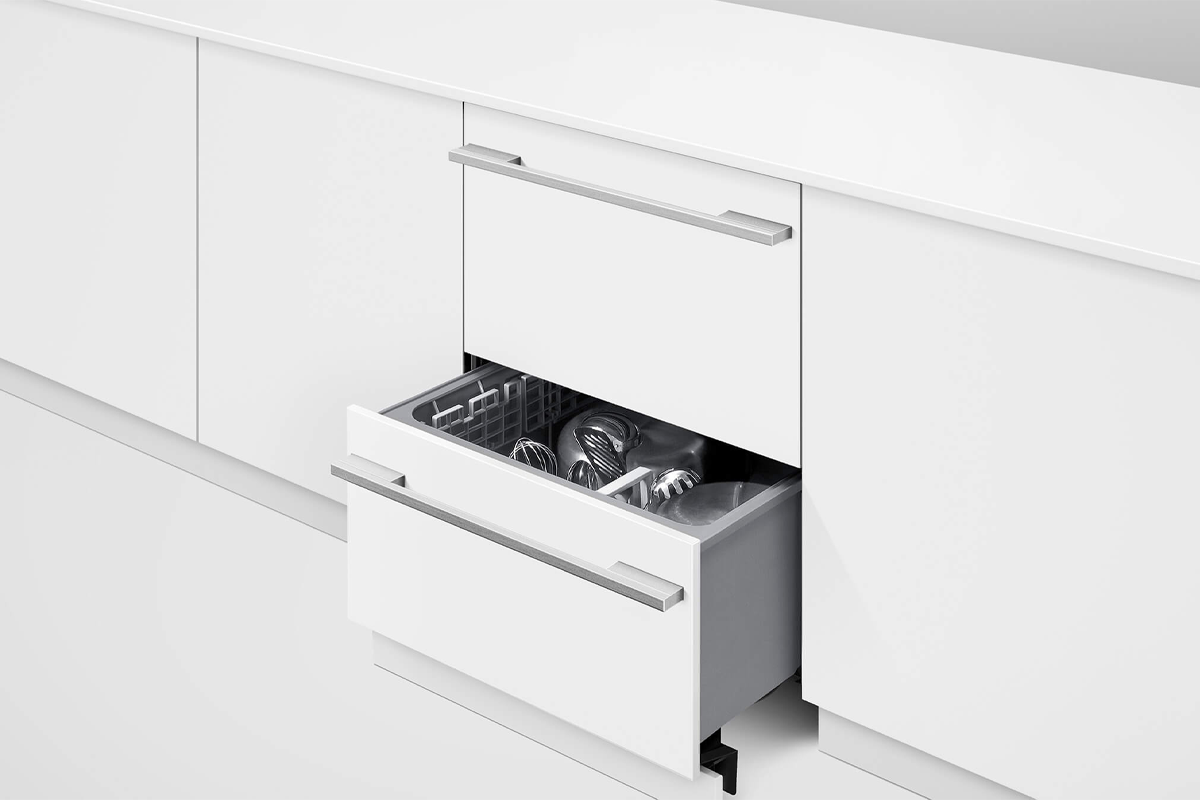
Having two drawers isn’t just about creating more space. With a dual-drawer configuration, you can run separate programs on each level. Wash delicate glassware in one compartment and heavily soiled pots in the other.
To pause a cycle, all you have to do is knock on the front panel. To restart, simply press the start/play button. This feature is especially handy if you’re prone to forgetting that pesky plate in
| Dishwasher type |
DishDrawer |
|---|---|
| Model Number |
DD60DI9 |
| Depth (mm) |
571 mm |
| Height (mm) |
820 mm |
| Width (mm) |
599 mm |
| Accessories included |
1 x 1650mm Inlet Hose
1 x 2000mm Drain Hose
|
| Can accommodate large dishes | |
| Capacity Place Settings |
14 |
| Finish Colour |
Integrated (Own Cabinetry) |
| Notes |
Integrated dishwashers will require custom-made Fascia Door Panels supplied by your cabinet maker or Builder. ** Maximum Plate size able to be used 280mm** |
| Removable Lid | |
| Finish Colour Description |
Integrated Dishwashers require a custom made fascia door panels provided by either builder or cabinet maker. |
| Installation Note |
Built under a benchtop Installation. |
| Water Inlets |
Cold Only |
|---|---|
| Features |
Installation Type: installed flush under your benchtop with the option of a custom-made Door and Kick panel.
Ease Of Use: easy to open and close as kitchen drawers and can be conveniently positioned at bench height for ease of loading.
Quick, Sanitise & Dry+ Options: The quick wash modifier delivers a faster wash, Sanitise option provides extra protection, killing 99.9% of bacteria, The Dry+ setting is perfect for plastic dishes.
True Half Load: Each drawer holds a true half load for small, fast washing that won't waste water.
Independently Operated: Both drawers operate independently so two wash cycles can operate simultaneously to allow for varying loads.
Quiet Operation: Both drawers operate independently so two wash cycles can operate simultaneously to allow for varying loads.
Drying: Fan-assisted drying.
Extra Features: KeyLock, Flood Protection, Flow through Detergent Dispenser, Motor Type BLDC.
Wash Programs:
Delicate
Eco
Fast
Heavy
Medium
Rinse
Wash Program Modifiers:
Extra Dry
Quick
Sanitise
|
| Height Adjustable Upper Basket | |
| Control type |
Push buttons |
| Cutlery Drawer | |
| Heavy Cycle | |
| Cutlery basket |
| Manufacturer Warranty |
2 Years |
|---|---|
| Use |
Not intended or designed for commercial use. |
| Energy Star Rating |
3.5 Stars |
|---|---|
| Energy Consumption(kWh/annum) |
136 |
| Type of connection |
10A plug & lead |
|---|---|
| Connection requirements |
This product requires a 10amp electrical connection. For more information, please contact Winning Services on 1300 020 020 or your electrician. |
| Length of cord |
1.65 m |
| Child lock | |
|---|---|
| Auto Power Off | |
| Overflow Protection | |
| Fault Indicator |
| 70 Degree wash program | |
|---|---|
| Number of Programs |
15 Programs |
| Quick wash | |
| Rinse Cycle | |
| Half load option |
| Delay Start | |
|---|---|
| Auto Load Sensing | |
| Time Remaining Display |
| Litres Used Per Wash |
6.9 L |
|---|---|
| Water Star Rating |
4.5 Stars |
| Litres Per Cycle |
6.9 Ltr/Cycle |
| WELS Product Registration Number |
D02062 |
| Light | |
|---|---|
| Steam | |
| Eco Mode | |
| Steam clean |
| Noise when working |
43 dB |
|---|
| Origin |
Thailand |
|---|
| Lid Included | |
|---|---|
| Primary Product Category |
DishDrawer Dishwashers |
| Water efficient |
4.5 |
| Energy consumption |
136 Kwh |
| Big dish friendly | |
| Rinse aid light Notification | |
| End of Wash Alarm | |
| Dishwasher Compartments (Foldable Bottom Racks) | |
| Dishwasher Compartments (Foldable Cup Shelves) | |
| Tall Glass Rack | |
| Dishdrawer | |
| Custom Installation | |
| Dishwasher Drawers |
Double Drawer |
| Fast Wash Option | |
| EAN |
9415112812099 |
| Eco Program | |
| Detachable lid |
Key Features

It shows the LG object collection products placed in the living room- styler, refrigerator, wash tower, etc.


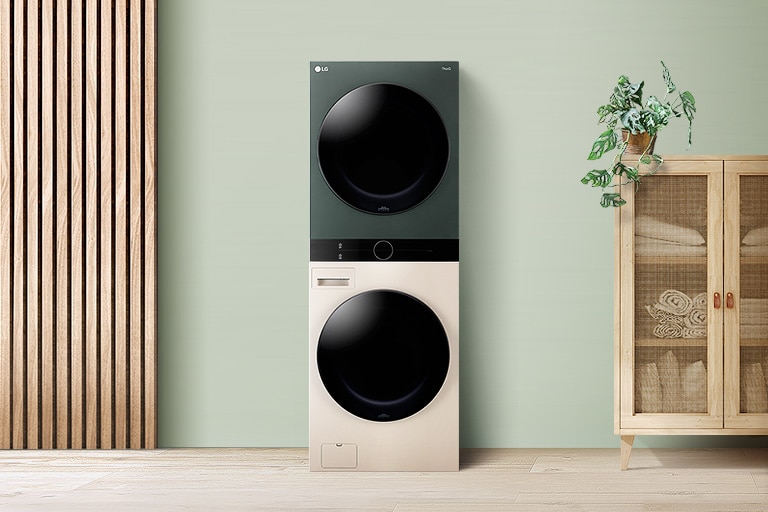

LG Objet WashTower™ presents a harmonious interior that fits perfectly with the built-in furniture in the bathroom.


Large view of the LG Objet WashTower center panel. A few buttons are on.


a black basic image

This is an image of the product panel. Dryer's Duvet button and Washer's Duvet button are highlighted.


There is a washing machine door, around which the water stream is spinning dynamically. Water spouts from five directions from the inside of the washing machine.





| Brand | LG |
|---|---|
| Model | F2515SNTGE |
| Product-Type | Front-Load Washing Machines |
| Colour | Graphite |
| Washer Capacity | 15kg |
|---|
| Weight (kg) | 71.0 |
|---|---|
| Product Height (cm) | 64.5cm |
| Product Width (cm) | 65cm |
| Product Depth (cm) | 95cm |
Video
NQ4 AI Gen2 Processor
Refresh Rate
100Hz (Up to 144Hz)
Resolution
4K (3,840 x 2,160)
Display
100"
Neo QLED
Screen Size
100"
Refresh Rate
100Hz (Up to 144Hz)
Resolution
4K (3,840 x 2,160)
Picture Engine
NQ4 AI Gen2 Processor
HDR (High Dynamic Range)
Neo Quantum HDR
HDR 10+
Yes (ADAPTIVE/ GAMING)
AI Upscale
4K AI Upscaling
Contrast
Quantum Matrix Technology Core
Viewing Angle
Wide Viewing Angle
Micro Dimming
Supreme UHD Dimming
Contrast Enhancer
Real Depth Enhancer
Motion Technology
Motion Xcelerator 144Hz
Smart Calibration
Basic
Filmmaker Mode (FMM)
Yes
Supersize Picture Enhancer
Yes
HDR Brightness Optimizer
Yes
Color Booster
Color Booster Pro
AI HDR Remastering
Auto HDR Remastering
EyeComfort Mode
Yes
Dolby Atmos
Yes
Object Tracking Sound
OTS Lite
Q-Symphony
Yes
Sound Output (RMS)
30W
Speaker Type
4CH
Active Voice Amplifier
Yes (Active Voice Amplifier Pro)
Adaptive Sound
Yes (Adaptive Sound Pro)
360 Audio
Yes
Operating System
Tizen™ Smart TV
Bixby
Yes
Far-Field Voice Interaction
Yes
Web Browser
Yes
SmartThings Hub / Matter Hub / IoT-Sensor Functionality / Quick Remote
Yes
Multi Device Experience
TV to Mobile, Mobile to TV, TV initiate mirroring, Sound Mirroring, Wireless TV On, Tap View
Multi-View
upto 2 videos
Apple AirPlay
Yes
Daily+
Yes
Storage Share
Yes
Generative Wallpaper
Yes
Karaoke Mic
Yes
Auto Game Mode (ALLM)
Yes
Game Motion Plus
Yes
Dynamic Black EQ
Yes
VRR
Yes
Surround Sound
Yes
Super Ultra Wide Game View
Yes
Mini Map Zoom
Yes
FreeSync
FreeSync Premium Pro
HGiG
Yes
AI Auto Game Mode
Yes
Digital Broadcasting
DVB-T2
Analog Tuner
Yes
TV Key
Yes
HDMI
4
USB
2 x USB-A
HDMI (High Frame Rate)
4K 144Hz (for HDMI 1/2/3/4)
Ethernet (LAN)
1
Digital Audio Out (Optical)
1
RF In (Terrestrial / Cable input)
1/1(Common Use for Terrestrial)/0
Wi-Fi
Yes (Wi-Fi 5)
Bluetooth
Yes(5.3)
Anynet+ (HDMI-CEC)
Yes
HDMI Audio Return Channel
eARC
Design
Simple Chamfer
Bezel Type
3 Bezel-less
Front Colour
TITAN BLACK
Stand Type
METAL LINEAR
Stand Colour
TITAN BLACK
Art Store
Yes
Embeded POP
Yes
EPG
Yes
Extended PVR
Yes
IP Control
Yes
OSD Language
Local Languages
Accessibillity - Voice Guide
Chinese (China),English (UK),Malay (Malaysia)
Low Vision Support
Relumino, Magnification, Audio Description, Zoom Menu and Text, High Contrast, SeeColors, Color Inversion, Grayscale, Auto Picture Off
Hearing Impaired Support
Closed Caption (Subtitle), Multi-output Audio, Sign Language Zoom
Motor Impaired Support
Slow Button Repeat, Remote Control App. for All
Eco Sensor
Yes
Power Supply
AC100-240V~ 50/60Hz
Power Consumption (Max)
440 W
Auto Power Off
Yes
Auto Power Saving
Yes
Package Size (WxHxD)
2399 x 1444 x 230 mm
Set Size with Stand (WxHxD)
2229.8 x 1332.4 x 415.4 mm
Set Size without Stand (WxHxD)
2229.8 x 1273.4 x 57.4 mm
Stand (Basic) (WxD)
1722.9 x 415.4 mm
VESA Spec
600 x 400 mm
Package Weight
80.7 kg
Set Weight with Stand
60.3 kg
Set Weight without Stand
58.9 kg
Remote Controller Model
TM2360E
Slim Fit Wall-mount Support
Yes
User Manual
Yes
SlimFit Cam Support
Yes
Zigbee / Thread Module
Built-In
Power Cable
Yes
Video
NQ4 AI Gen3 Processor
Refresh Rate
100Hz (Up to 144Hz)
Resolution
4K (3,840 x 2,160)
Display
55"
OLED
Screen Size
55"
Resolution
4K (3,840 x 2,160)
Refresh Rate
100Hz (Up to 144Hz)
Anti Reflection
Yes
Picture Engine
NQ4 AI Gen3 Processor
HDR (High Dynamic Range)
OLED HDR+
HDR 10+
Yes (ADAPTIVE/ GAMING)
Contrast
Self-illuminating pixels
Viewing Angle
Ultra Viewing Angle
Contrast Enhancer
Real Depth Enhancer
Motion Technology
Motion Xcelerator 144Hz
Smart Calibration
Basic
AI Upscale
4K AI Upscaling Pro
AI Motion Enhancer
AI Motion Enhancer Pro
HDR Brightness Optimizer
Yes
Filmmaker Mode (FMM)
Yes
Color Booster
Color Booster Pro
AI HDR Remastering
Auto HDR Remastering pro
EyeComfort Mode
Yes
Dolby Atmos
Yes
Object Tracking Sound
OTS Lite
Q-Symphony
Yes
Sound Output (RMS)
40W
Speaker Type
2.1CH
Active Voice Amplifier
Yes (Active Voice Amplifier Pro)
Adaptive Sound
Yes (Adaptive Sound Pro)
360 Audio
Yes
Operating System
Tizen™ Smart TV
Bixby
Yes
Far-Field Voice Interaction
Yes
Web Browser
Yes
SmartThings Hub / Matter Hub / IoT-Sensor Functionality / Quick Remote
Yes
Multi Device Experience
TV to Mobile, Mobile to TV, TV initiate mirroring, Sound Mirroring, Wireless TV On, Tap View
Multi-View
upto 2 videos
Ambient Mode
Yes
Apple AirPlay
Yes
Daily+
Yes
Storage Share
Yes
Karaoke Mic
Yes
Auto Game Mode (ALLM)
Yes
Game Motion Plus
Yes
Dynamic Black EQ
Yes
VRR
Yes
Surround Sound
Yes
Super Ultra Wide Game View
Yes
Mini Map Zoom
Yes
FreeSync
FreeSync Premium Pro
HGiG
Yes
AI Auto Game Mode
Yes
Digital Broadcasting
DVB-T2
Analog Tuner
Yes
TV Key
Yes
HDMI
4
HDMI (High Frame Rate)
4K 144Hz (for HDMI 1/2/3/4)
USB
2 x USB-A
Ethernet (LAN)
1
Digital Audio Out (Optical)
1
RF In (Terrestrial / Cable input)
1/1(Common Use for Terrestrial)/0
HDMI Audio Return Channel
eARC
Wi-Fi
Yes (Wi-Fi 5)
Bluetooth
Yes (BT5.3)
Anynet+ (HDMI-CEC)
Yes
Design
LaserSlim
Bezel Type
4 Bezel-less
Front Colour
GRAPHITE BLACK
Stand Type
SIMPLE PLUS BLADE
Stand Colour
SPACE TITAN
EPG
Yes
Extended PVR
Yes
IP Control
Yes
OSD Language
Local Languages
Accessibillity - Voice Guide
Chinese (China),English (UK),Malay (Malaysia)
Low Vision Support
Audio Subtitles, Magnification, Audio Description, Zoom Menu and Text, High Contrast, SeeColors, Color Inversion, Grayscale, Auto Picture Off
Hearing Impaired Support
Closed Caption (Subtitle), Multi-output Audio, Sign Language Zoom
Motor Impaired Support
Slow Button Repeat, Remote Control App. for All
Power Supply
AC100-240V~ 50/60Hz
Power Consumption (Max)
320 W
Power Consumption (Stand-by)
0.5 W
Power Consumption (Typical)
111.1 W
Yearly Power Consumption (EU standard)
206.23 kWh
Eco Sensor
Yes
Auto Power Saving
Yes
Energy Efficiency Class
2
Auto Power Off
Yes
Package Size (WxHxD)
1385 x 832 x 153 mm
Set Size with Stand (WxHxD)
1225.4 x 773.6 x 265.2 mm
Set Size without Stand (WxHxD)
1225.4 x 708.6 x 39.9 mm
Stand (Basic) (WxD)
366.0 x 265.2 mm
VESA Spec
300 x 200 mm
Package Weight
22.9 kg
Set Weight with Stand
17.3 kg
Set Weight without Stand
16 kg
Remote Controller Model
TM2360E
Slim Fit Wall-mount Support
Yes
Full Motion Slim Wall Mount (Y22)
Yes
SlimFit Cam Support
Yes
Zigbee / Thread Module
Built-In
User Manual
Yes
Power Cable
Yes
Video
NQ4 AI Gen3 Processor
Refresh Rate
100Hz (Up to 144Hz)
Resolution
4K (3,840 x 2,160)
Display
65"
OLED
Screen Size
65"
Resolution
4K (3,840 x 2,160)
Refresh Rate
100Hz (Up to 144Hz)
Anti Reflection
Yes
Picture Engine
NQ4 AI Gen3 Processor
HDR (High Dynamic Range)
OLED HDR+
HDR 10+
Yes (ADAPTIVE/ GAMING)
Contrast
Self-illuminating pixels
Viewing Angle
Ultra Viewing Angle
Contrast Enhancer
Real Depth Enhancer
Motion Technology
Motion Xcelerator 144Hz
Smart Calibration
Basic
AI Upscale
4K AI Upscaling Pro
AI Motion Enhancer
AI Motion Enhancer Pro
HDR Brightness Optimizer
Yes
Filmmaker Mode (FMM)
Yes
Color Booster
Color Booster Pro
AI HDR Remastering
Auto HDR Remastering pro
EyeComfort Mode
Yes
Dolby Atmos
Yes
Object Tracking Sound
OTS Lite
Q-Symphony
Yes
Sound Output (RMS)
40W
Speaker Type
2.1CH
Active Voice Amplifier
Yes (Active Voice Amplifier Pro)
Adaptive Sound
Yes (Adaptive Sound Pro)
360 Audio
Yes
Operating System
Tizen™ Smart TV
Bixby
Yes
Far-Field Voice Interaction
Yes
Web Browser
Yes
SmartThings Hub / Matter Hub / IoT-Sensor Functionality / Quick Remote
Yes
Multi Device Experience
TV to Mobile, Mobile to TV, TV initiate mirroring, Sound Mirroring, Wireless TV On, Tap View
Multi-View
upto 2 videos
Ambient Mode
Yes
Apple AirPlay
Yes
Daily+
Yes
Storage Share
Yes
Karaoke Mic
Yes
Auto Game Mode (ALLM)
Yes
Game Motion Plus
Yes
Dynamic Black EQ
Yes
VRR
Yes
Surround Sound
Yes
Super Ultra Wide Game View
Yes
Mini Map Zoom
Yes
FreeSync
FreeSync Premium Pro
HGiG
Yes
AI Auto Game Mode
Yes
Digital Broadcasting
DVB-T2
Analog Tuner
Yes
TV Key
Yes
HDMI
4
HDMI (High Frame Rate)
4K 144Hz (for HDMI 1/2/3/4)
USB
2 x USB-A
Ethernet (LAN)
1
Digital Audio Out (Optical)
1
RF In (Terrestrial / Cable input)
1/1(Common Use for Terrestrial)/0
HDMI Audio Return Channel
eARC
Wi-Fi
Yes (Wi-Fi 5)
Bluetooth
Yes (BT5.3)
Anynet+ (HDMI-CEC)
Yes
Design
LaserSlim
Bezel Type
4 Bezel-less
Front Colour
GRAPHITE BLACK
Stand Type
SIMPLE PLUS BLADE
Stand Colour
SPACE TITAN
EPG
Yes
Extended PVR
Yes
IP Control
Yes
OSD Language
Local Languages
Accessibillity - Voice Guide
Chinese (China),English (UK),Malay (Malaysia)
Low Vision Support
Audio Subtitles, Magnification, Audio Description, Zoom Menu and Text, High Contrast, SeeColors, Color Inversion, Grayscale, Auto Picture Off
Hearing Impaired Support
Closed Caption (Subtitle), Multi-output Audio, Sign Language Zoom
Motor Impaired Support
Slow Button Repeat, Remote Control App. for All
Power Supply
AC100-240V~ 50/60Hz
Power Consumption (Max)
530 W
Power Consumption (Stand-by)
0.5 W
Power Consumption (Typical)
145.1 W
Yearly Power Consumption (EU standard)
268.28 kWh
Eco Sensor
Yes
Auto Power Saving
Yes
Energy Efficiency Class
2
Auto Power Off
Yes
Package Size (WxHxD)
1617 x 950 x 160 mm
Set Size with Stand (WxHxD)
1444.3 x 896.7 x 265.2 mm
Set Size without Stand (WxHxD)
1444.3 x 831.7 x 39.9 mm
Stand (Basic) (WxD)
366.0 x 265.2 mm
VESA Spec
300 x 200 mm
Package Weight
28.0 kg
Set Weight with Stand
20.4 kg
Set Weight without Stand
19.1 kg
Remote Controller Model
TM2360E
Slim Fit Wall-mount Support
Yes
Full Motion Slim Wall Mount (Y22)
Yes
SlimFit Cam Support
Yes
Zigbee / Thread Module
Built-In
User Manual
Yes
Power Cable
Yes


An OLED TV with Samsung Vision AI displays purple structures like glaciers on its screen.


With updated intelligence, Bixby in your Samsung AI TV is the perfect center of your AI home. It can process multiple commands at once, and it's better at grasping the wider context. Enjoy smoother conversations, easier searches, more intuitive reactions and seamless device control.
* Voice commands and multi turn is supported for 10 languages (US/UK/IN(en)/DE/FR/IT/ES/BR/MX/KR).* Not all accents, dialects and expressions recognized.* Q8F and above support far-field mics. Q7F and above support TV remotes. U8000F needs a SmartThings mobile remote.

AI Mode offers a quick-access menu to adjust adaptive picture and sound settings, intelligently optimizing your TV experience to your surroundings and the content you're watching.

Listen to sound just as the creators intended, with clear voices and vivid, balanced tones. Your TV's AI processor recognizes different sounds — like dialogue and background music — and optimizes them for their type and your room's acoustics, before ultimately refining them with audio remastering technology.
* Experience may vary depending on the content and environment.
Use your TV as a pet-sitting assistant when you're outside. Your TV can detect noises like barking through its microphone, and then automatically turn on your pet's favorite content to calm them down.
* Real-time streaming on mobile devices is supported on Android OS 11.0 and higher versions or iOS 16.0 and higher versions, and is available on 2025 Samsung TVs and later models. It only works when the TV is turned off. * TV must be connected to a power source to use this feature.* TV and mobile device must be connected to SmartThings to send and receive notifications.Powered by 128 AI neural networks, this AI processor enhances your picture and sound to superb heights. Enjoy the best 4K TV experience, whether you're streaming OTT services, playing your favorite video games or watching live sports.


Samsung NQ4 AI Gen3 Processor chip descends on the TV's main board and lights up with waves of power surging from the chip to the rest of the TV.


Watch your favorite content in more brilliant detail. Our AI processor can take your content and enhance it up to 4K resolution with 128 AI neural networks — all while maintaining incredibly sharp and smooth picture quality.


Image of a little girl kissing a puppy. The Samsung NQ4 AI Gen3 Processor appears on the photo and enhances several details, including the girl’s hair and clothes and the puppy’s face. The result is a much sharper image where subtle details are visible.


Our processor analyzes each scene and boosts for improved brightness. The result is an incredibly bright screen with a deeper range of contrast, which makes even minor details stand out.


* The range of HDR luminance is based on internal testing standards and is subject to change according to viewing conditions or specifications.* For S90F 42 and 48" : OLED HDR applied.


Samsung’s unique OLED expresses deep blacks, clean whites and a full range of lively colors. With cutting-edge self-illuminating pixels, what you see is a picture that's pure, bright and more accurate than ever before.


Watch the figures on screen stand out with more realism. Real Depth Enhancer increases the contrast between the objects in the foreground from the background — mirroring how a human eye processes depth. So when you're watching a nature documentary, it really looks like the rhinos are marching toward you.

As a trusted symbol of color fidelity by industry experts, ‘PANTONE Validated' certifies the accurate expression of 2,140 PANTONE colors and 110 newly-added skin tone shades. So you can be sure that you're getting a rich, true-to-life viewing experience.
* PANTONE validation received based on HDR screen.

In a dim room, the words Samsung Vision AI is accompanied by the Samsung AI logo. A TV turns on to display a bright abstract blue landscape with a yellow tinge.


With updated intelligence, Bixby in your Samsung AI TV is the perfect center of your AI home. It can process multiple commands at once, and it's better at grasping the wider context. Enjoy smoother conversations, easier searches, more intuitive reactions and seamless device control.1


AI Mode offers a quick-access menu to adjust adaptive picture and sound settings, intelligently optimizing your TV experience to your surroundings and the content you're watching.

Listen to sound just as the creators intended, with clear voices and vivid, balanced tones. Your TV's AI processor recognizes different sounds — like dialogue and background music — and optimizes them for their type and your room's acoustics, before ultimately refining them with audio remastering technology.2

Use your TV as a pet-sitting assistant when you're outside. Your TV can detect noises like barking through its microphone, and then automatically turn on your pet's favorite content to calm them down.3
Powered by 128 AI neural networks, this AI processor enhances your picture and sound to superb heights. Enjoy the best 4K TV experience, whether you're streaming OTT services, playing your favorite video games or watching live sports.


Samsung NQ4 AI Gen3 Processor chip descends on the TV's main board and lights up with waves of power surging from the chip to the rest of the TV.


Watch your favorite content in more brilliant detail. Our AI processor can take your content and enhance it up to 4K resolution with 128 AI neural networks — all while maintaining incredibly sharp and smooth picture quality.


Image of a little girl kissing a puppy. The Samsung NQ4 AI Gen3 Processor appears on the photo and enhances several details, including the girl’s hair and clothes and the puppy’s face. The result is a much sharper image where subtle details are visible.


See real blacks perfected by Glare Free, our most advanced anti glare technology. Designed to reduce reflections to a level that is barely noticeable, Glare Free also minimizes discomfort from glare and disability glare so you can enjoy a clearer, more comfortable and more focused viewing experience under indoor lighting.4


Experience brilliant viewing with brighter brights and darker darks. Our AI processor analyzes each scene to dynamically tone map for contrast and boost for brightness. The result is an incredibly powerful screen that brings every little detail to life.


A dimly lit building in "SDR" quality is transformed by "OLED HDR Pro" technology to reveal bright highlights and hidden details that make the intricate design of the building come to life.


NQ4 AI Gen3 Processor
Our most advanced AI-powered 4K processor
Glare Free
Watch clearly without distracting reflections
OLED HDR Pro
More powerful brightness and richer contrast
Motion Xcelerator 165Hz
Get ultra-smooth motion for games up to 165Hz

[AVForums] Best Buy Award
"The Samsung S95F is an excellent QD-OLED TV that offers superb HDR, SDR, and Gaming performance." " The Samsung S95F's HDR10 and HDR10+ performance is excellent, with deep, fluid blacks, excellent shadow detail retrieval, and vibrant mid tones with detail and depth that add realism to almost every scene"

[
[T3 Awards 2025] Best of the Year - Best TV
“The S95F just brings out the best for both gaming and home-cinema uses.”
[T3 Awards 2025] Best of the Year - Best Gaming TV
“The S95F’s brightness is what’s really outstanding - making games look truly incredible.”
In a dim room, the words Samsung Vision AI is accompanied by the Samsung AI logo. A TV turns on to display a bright abstract blue landscape with a yellow tinge.
With updated intelligence, Bixby in your Samsung AI TV is the perfect center of your AI home. It can process multiple commands at once, and it's better at grasping the wider context. Enjoy smoother conversations, easier searches, more intuitive reactions and seamless device control.1
AI Mode offers a quick-access menu to adjust adaptive picture and sound settings, intelligently optimizing your TV experience to your surroundings and the content you're watching.
Listen to sound just as the creators intended, with clear voices and vivid, balanced tones. Your TV's AI processor recognizes different sounds — like dialogue and background music — and optimizes them for their type and your room's acoustics, before ultimately refining them with audio remastering technology.2
Use your TV as a pet-sitting assistant when you're outside. Your TV can detect noises like barking through its microphone, and then automatically turn on your pet's favorite content to calm them down.3
Powered by 128 AI neural networks, this AI processor enhances your picture and sound to superb heights. Enjoy the best 4K TV experience, whether you're streaming OTT services, playing your favorite video games or watching live sports.
Samsung NQ4 AI Gen3 Processor chip descends on the TV's main board and lights up with waves of power surging from the chip to the rest of the TV.
Watch your favorite content in more brilliant detail. Our AI processor can take your content and enhance it up to 4K resolution with 128 AI neural networks — all while maintaining incredibly sharp and smooth picture quality.
Image of a little girl kissing a puppy. The Samsung NQ4 AI Gen3 Processor appears on the photo and enhances several details, including the girl’s hair and clothes and the puppy’s face. The result is a much sharper image where subtle details are visible.
See real blacks perfected by Glare Free, our most advanced anti glare technology. Designed to reduce reflections to a level that is barely noticeable, Glare Free also minimizes discomfort from glare and disability glare so you can enjoy a clearer, more comfortable and more focused viewing experience under indoor lighting.4
Experience brilliant viewing with brighter brights and darker darks. Our AI processor analyzes each scene to dynamically tone map for contrast and boost for brightness. The result is an incredibly powerful screen that brings every little detail to life.


No account yet?
Create an Account


